
Student iCON
Access your Student iCON account to support your digital learning.
Student iCON
Access Student iCON to view your account and digital learning services.
Frequently Asked Questions
Q1. What is the naming convention for Student iCON email address?
The student’s email address will be based on @students.edu.sg.
Any space in the full name will be replaced with an underscore.
Should the student’s full name have words such as “Bte” and “s/o”, they will not appear in the email address.
For cases where students share the same full name, we have added a numerical number (e.g. Jon_Tan_1, Jon_Tan_2) to differentiate their email addresses.
Alternatively, you can check with your Form Teacher on your Student iCON email address.
Q2. How can my child log in to Student iCON?
Student iCON is web-based. Students can use their web browser in their internet- enabled computing or mobile devices to visit https://workspace.google.com/dashboard (opens in new tab) to access Student iCON.
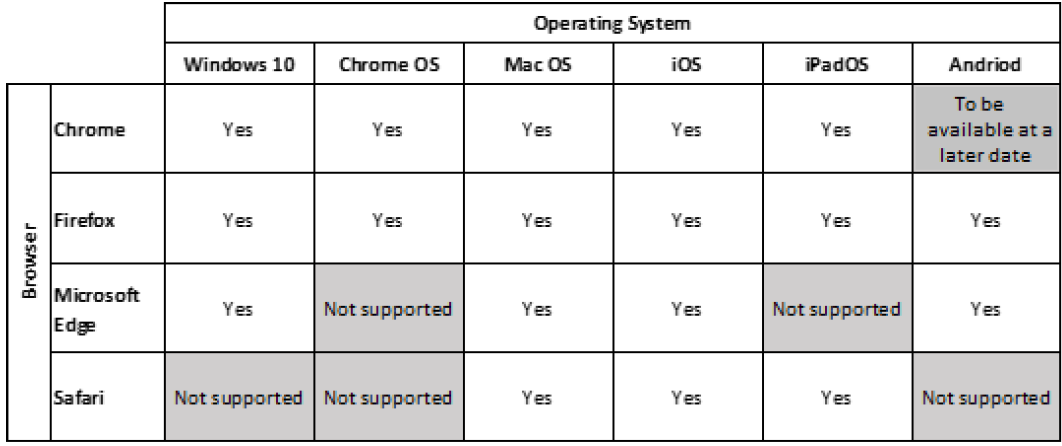
Q3. Which Operating System or browser should my students use?
You can refer to the following table for guidance on the Operating Systems/browsers which students can use to log in.
Q4. Can I link the Student iCON account to an email app on my Android/iOS mobile device?
Student iCON is not accessible from mobile device applications at this moment. Only login via browser is supported.
Q5. What if I have forgotten my MIMS password?
If you have forgotten your MIMS password and have set up your MIMS Challenge questions, self-reset by clicking “Forgot Password?” at https://mims.moe.gov.sg/sspr (opens in new tab)
Alternatively approach Ms Stella or Mr Rasis at the ICT Room to reset your password.